The problem
I wanted to check my OpenRouter balance and recent spending without opening the browser dashboard each time.
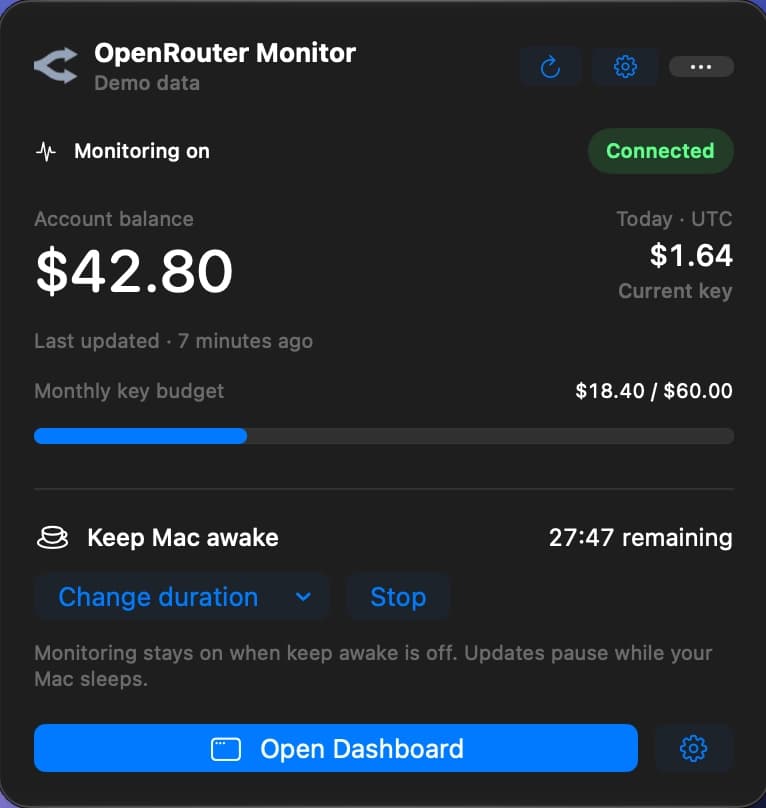
I built a macOS menu bar app for checking OpenRouter balance, spending and model activity, with budget alerts and keep-awake controls.
I wanted to check my OpenRouter balance and recent spending without opening the browser dashboard each time.
I kept quick checks in the menu bar and put account activity, model usage and pricing in a separate dashboard.
The app brings monitoring, budget alerts and keep-awake controls together. Its Mac App Store release is in preparation.
Using OpenRouter meant returning to its dashboard to check balance, spending and recent model activity. Those were the checks I wanted within reach while working.
I chose a menu bar app for the account overview, with separate views for activity and model usage. Detailed account management stays in OpenRouter.
I kept balance, spending and recent activity on the overview. You can check those figures before opening a more detailed view.
I built the interface in SwiftUI and stored API credentials in the macOS Keychain. The app opens from the menu bar when needed.
I gave spending trends and model usage their own dashboard views. The menu bar remains compact, with more detail available when a check needs it.
The secret API key is stored in Keychain. Settings and usage snapshots stay in a local data file, with a JSON export that excludes the secret key.
The compact panel shows balance, current-key spending and budget progress. Keep-awake controls are close at hand while a long task is running.
The dashboard has Overview, Models and Activity views for balances, grouped usage, spending trends and tracked prices. Account-wide information requires a management-capable OpenRouter key.
Settings cover budgets, notifications, model tracking, refresh intervals and JSON export. Keep-awake sessions have optional display and battery controls.
The app has a product page, support contact and privacy policy. Its Mac App Store release is in preparation.
You can check balance, spending and model activity in the native Mac app.
I kept billing changes and detailed account management in OpenRouter.